Showing posts with label System Tweaks. Show all posts
Showing posts with label System Tweaks. Show all posts
Friday, April 15, 2011


Tuesday, March 10, 2009
Speed Up Pc Computer Using Windows Tweak | How to Speed up your PC by this simple RAM tweak
How to Speed up your PC by this simple Ram Memory tweak
Well this E Learning Tutorial or in other terms a Windows Tweak for the Techs. So… Faster Computer, first of all why a Faster Pc Performance?? Well its not a question of a Faster PC but this is more a question of when. If you’ve been running heavy Software Programs (maybe 3d video game, Photoshop, something like that) the RAM can get taken up quickly. Even when you close down these Computer Programs, Ram Memory can still be eaten-up.
You’ll notice this effect at the end of the day. When you first turn on your PC it’s running smoothly, by the end of the day slows down. Yes, you can get various Software Applications to solve this. May of which costs but when free things matters, here is how a simple Windows Tweak can work (in both XP and Vista)
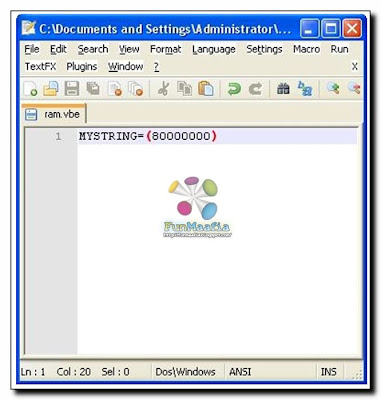
1. Open up Windows Notepad (I use Notepad++, review coming soon)
2. Type in MYSTRING=(80000000)
3. Save the file as MEMORY.VBE (or RAM.VBE if you like…just remember the .VBE)
4. Make sure you save the file to your DESKTOP.
5. Just double-click the newly created file on your desktop whenever your PC seems to slow down. It will give your RAM a much needed Boost.
Not that if you have less than Ram Memory 128mb (do you really? If so then Oh! wake up you need a Memory Upgrade. (Ram Upgrading will make your PC a lot faster) change the 80000000 to 160000000 and it should work the same.
RAM Defrag is nice Freeware Software utility that frees up your RAM however it clears of all the injected DLL’s and the Cache so the Computer may get more sluggish for a while a Defrag.
Liked the Trick, I hope you wont mind in wasting 20 seconds and writing me a comment below. Thanks for that !
Well this E Learning Tutorial or in other terms a Windows Tweak for the Techs. So… Faster Computer, first of all why a Faster Pc Performance?? Well its not a question of a Faster PC but this is more a question of when. If you’ve been running heavy Software Programs (maybe 3d video game, Photoshop, something like that) the RAM can get taken up quickly. Even when you close down these Computer Programs, Ram Memory can still be eaten-up.
You’ll notice this effect at the end of the day. When you first turn on your PC it’s running smoothly, by the end of the day slows down. Yes, you can get various Software Applications to solve this. May of which costs but when free things matters, here is how a simple Windows Tweak can work (in both XP and Vista)
1. Open up Windows Notepad (I use Notepad++, review coming soon)
2. Type in MYSTRING=(80000000)
3. Save the file as MEMORY.VBE (or RAM.VBE if you like…just remember the .VBE)
4. Make sure you save the file to your DESKTOP.
5. Just double-click the newly created file on your desktop whenever your PC seems to slow down. It will give your RAM a much needed Boost.
Not that if you have less than Ram Memory 128mb (do you really? If so then Oh! wake up you need a Memory Upgrade. (Ram Upgrading will make your PC a lot faster) change the 80000000 to 160000000 and it should work the same.
RAM Defrag is nice Freeware Software utility that frees up your RAM however it clears of all the injected DLL’s and the Cache so the Computer may get more sluggish for a while a Defrag.
Liked the Trick, I hope you wont mind in wasting 20 seconds and writing me a comment below. Thanks for that !
Thursday, February 5, 2009
Increase Hard Disk speed in Windows

If you like to increase, optimize your Hard Disk IO - readwrite speed without buying expensive software utilities to do that job or changing the HD, just follow next steps. With doing these steps you will increase Hard disk speed (depends of manufacture and specification, but its worth to try). The most speed improvement is visible with IDE drives; however there are reports that this tweak also does good for SCSI disks.
In any case, it won't harm your system, so try it yourself and let me know what you find!
Steps
1. Run SYSEDIT.EXE from the start & then Run command.
2. Expand the system.ini file window.
3. Scroll down almost to the end of the file untill you find a line called [386enh].
4. Press Enter to make one blank line, and in that line type
5. Irq14=4096 (note This line IS CASE SENSITIVE)
6. Click on the File menu, then choose Save.
7. Close SYSEDIT and reboot your computer.
8. Restart windows!
The speed improvement will be noticed just after the system reboots, any system info. software can be used to check the improvement.
Tags: disk management, partition, hard disk, hard disk drive, hdd, boot, disk editor, reorganize, diagnostic, windows, windows xp, winxp, win xp, tune-up, tweak, tips, free, download, software
Subscribe to:
Posts (Atom)